Campaign tracking skill for Claude Code, Codex & Cursor

The site counted it. The ads never saw it.

Your agent says the tracking works, because the site shows a lead. The Campaign Tracker Pack makes it set up each client the same way: short links from a Google Sheet, first-touch UTM tags kept without cookies, leads and purchases sent to Meta from the server, and cost per lead in one sheet. Then it proves the setup on the live Worker. It tracks this shop and its skills site today.

$39. Every pack, now and later: $149.

Works with

  • Claude Code
  • Codex
  • Gemini CLI
  • Cursor
  • Windsurf
  • Aider

Fit check

Is this for you?

It’s for you if

  • You run Meta ads for your own sites or your clients’, and want each lead and sale tied to the ad that brought it.
  • You want short links, UTM tags, visits, leads, ad spend and cost per lead in one Google Sheet.
  • You set up tracking for more than one client and want it done the same way every time.

You’ll need

  • An AI coding agent that can run commands: Claude Code, Codex, Cursor or Gemini CLI.
  • Each site on Cloudflare with its DNS proxied, and Node.js 18 or newer. Nothing else to install.
  • For the parts you use: a Meta dataset and ad account, a Fathom site per host, and a Google account.

Skip it if

  • Your site isn’t on Cloudflare, or its DNS record isn’t proxied. The tracker runs in front of the site, so it needs both.
  • You want a browser pixel only. This version sends Meta its events from the server; a pixel option isn’t in it yet.

The sheet

The owner’s morning read.

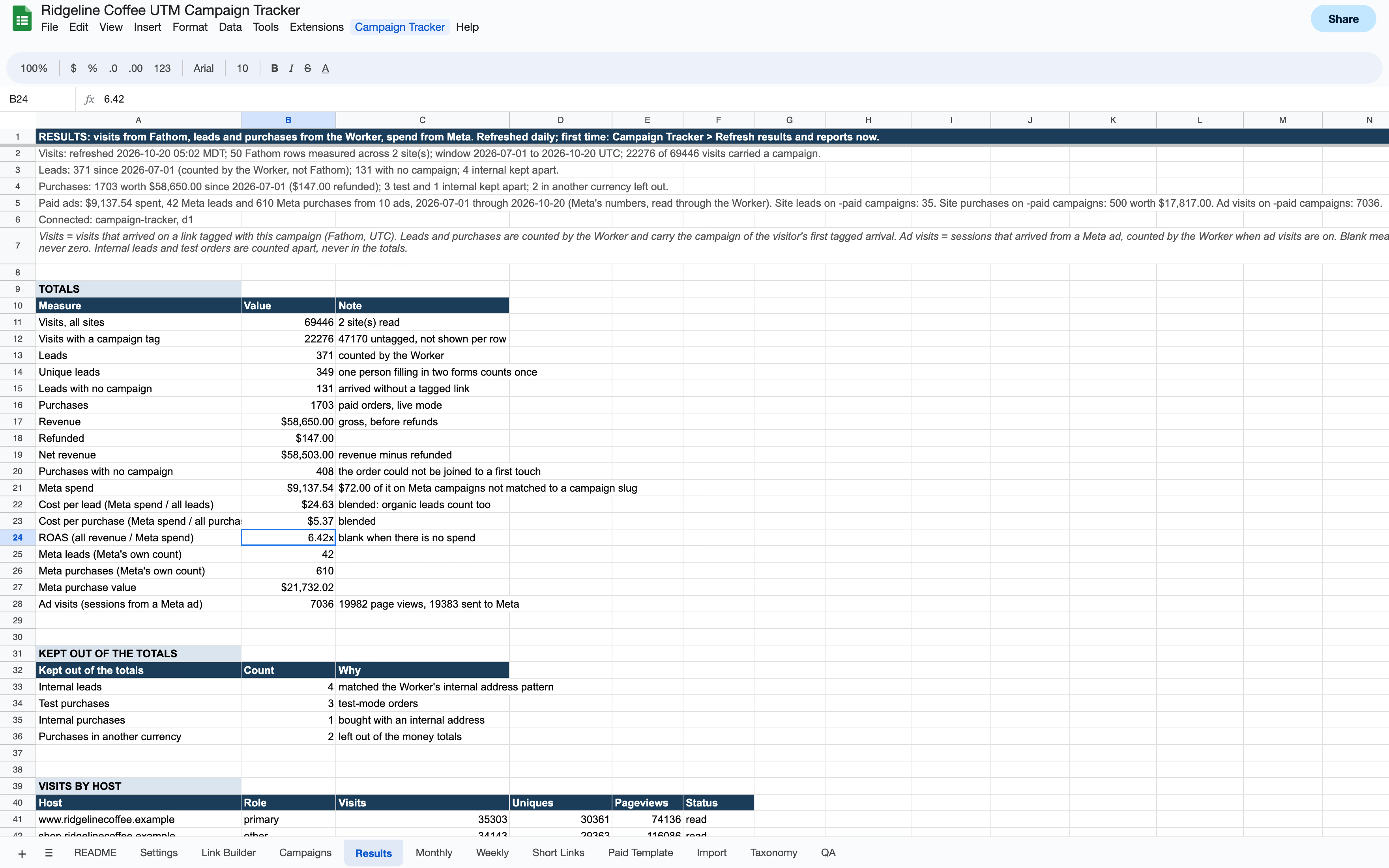
The sheet the pack sets up, shown with a sample coffee roaster’s first sixteen weeks on it: short links, ad spend, revenue, cost per lead and ROAS, per campaign and per ad. The pack’s own sheet code computed every table from that sample, so each total agrees with every other tab.

Choose a tab

The Results tab of a Campaign Tracker sheet with sample data: totals for visits, leads, purchases, revenue, Meta spend, cost per lead, cost per purchase and ROAS, under status lines for each source. (opens the full-size image)
The totals: visits on both sites, leads, purchases, revenue, Meta spend, cost per lead and per purchase, and ROAS. The status lines above say where each number came from and what was kept out.Open full size

Sample data: Ridgeline Coffee isn’t a real business, and its sites are on the reserved .example domain. The tables come from the 1.0.0 sheet code run on a day-by-day simulation; the window around them is drawn, not captured from Google Sheets. A blank cell means what it means in the sheet: nothing to divide by, or a number that couldn’t be read.

Sound familiar?

Has this ever happened to you?

Tap every one you’ve lived through.

Nothing yet? Compare your leads with what Meta counted.

Why it keeps happening

Tracking fails without a sound.

A tracking setup runs through the site, its form tool, the firewall, Meta, the analytics and a sheet. When one of them drops an event, nothing raises an error. The page still loads and the form still sends its email, so the agent reports success and means it.

So the numbers go wrong before anyone looks. The ads learn from events that never arrived, cost per lead reads high or blank, and you find out later, comparing the sheet with the inbox by hand.

What the sheet asked for

Its visits and leads, read from the site’s own address.

What came back

A firewall challenge, as a 403 page. Google’s servers fetch with no browser, so they can’t pass one.

Observed in October 2026 on the setup this pack was built from. The sheet and every webhook now call the Worker’s workers.dev address, which the site’s firewall never sees.

The fix

Make it prove the numbers.

The Campaign Tracker Pack is one skill your agent loads and nine scripts it runs. It sets up every client in the same order, from intake to a live check that prints what it measured, and nothing goes live on a client’s site until its owner says yes.

  1. Events from the server

    Leads and purchases go to the Meta Conversions API from a Cloudflare Worker, with no browser pixel and no cookie. A lead is stored as a salted hash, never an email or a name.

  2. One sheet, no vendor tokens

    Short links, visits, leads, revenue, Meta spend, cost per lead and ROAS in one Google Sheet. Every vendor token stays in Cloudflare; the sheet holds one key for the Worker.

  3. Proven with the test code off

    verify checks the live Worker and prints a PASS or FAIL line for each check. With --final, a Meta test code still set is a FAIL, so setup can’t end with it on.

Proof

Real runs of the download.

Three runs of the shipped zip, unzipped fresh, with the network blocked. The harness breaks copies of the scripts and each broken copy must fail; the Worker’s own selftest runs it against a mocked Cloudflare; and verify refuses to run with no client named.

[ Range card ] // What I aimed for, what came back
  1. [ Shot 01 ]

    ci/campaign-tracker-skills.mjs

    Aimed: every selftest, then copies of the scripts broken on purpose; each broken copy must fail

    ok sheet-check.mjs --selftest: 148/148 cases, as SKILL.md states

    ok worker-check selftest fails with the short-link host check removed (an open redirect) (7 case(s), e.g. "go: a row pointing at a foreign host is refused → 404 (no open redirec")

    campaign tracker: clean (44 checks)

    Landed where it was aimed // exit 0

  2. [ Shot 02 ]

    worker-check.mjs --selftest

    Aimed: the Worker against a mocked Cloudflare; every case must behave as designed

    PASS lead: an internal address → row flagged internal, NOT sent to Meta without a test code (skipped_internal)

    PASS surecart: the same order under a new event id → duplicate_order, still one row and one Meta call

    PASS capi: external_id is the salted lead key (HMAC of the email)

    372/372 passed

    Landed where it was aimed // exit 0

  3. [ Shot 03 ]

    verify.mjs (no client named)

    Aimed: a live check with nothing to check; it must refuse before any request

    usage: node verify.mjs <client> [--base <workers.dev url>] [--host <host>] [--test-lead] [--test-browser-lead] [--test-purchase] [--test-visit] [--final] [--key-file <path>] [--webhook-key-file <path>] [--dir <workspace>] | --selftest (keys from env CT_API_KEY / CT_WEBHOOK_SECRET or the files, never arguments)

    Landed where it was aimed // exit 2

Run from a fresh unzip of the 1.0.0 download on Node 25, with the network blocked. Indents and column padding trimmed; nothing else changed.

Who it’s for

Built for people who run ads for clients.

For
Developers, freelancers and small studios who run Meta ads for their own sites or their clients’, and set up the tracking with an AI coding agent (Claude Code, Codex, Cursor, Gemini CLI).
Best fit
Lead sites and small stores where each lead and sale should be tied to the ad that brought it, with the links, spend and cost per lead in a sheet the owner can read.
Works with
Any site behind Cloudflare with its DNS proxied: WordPress, a static site or a React app. Meta’s Conversions API, Fathom, Google Sheets, SureCart or any checkout that signs a webhook, and SureContact for leads. Node 18 or newer, and wrangler.
Not for
A site that isn’t on Cloudflare, or a setup that wants a browser pixel: there is no pixel option in this release. Conversion events go to Meta only; the links and UTM tags work for any channel.

One skill, four jobs.

One skill does the whole setup, in order. Each job below is a part of it, with a line from the selftest that proves it.

Explain it
  1. worker-check.mjs --selftest (short links)

    PASS go: a row pointing at a foreign host is refused → 404 (no open redirect)

    PASS go: a look-alike host is refused (exact hostname match)

    PASS go: sheet unreachable → the last good copy in D1 answers

    Pass

    Short links from the sheet

    Short links on the client’s own domain, edited in a Google Sheet, with the UTM tags built in. A link can only point at the client’s own hosts, and if the sheet can’t be read, the last good copy answers.

    • campaign-tracker
  2. snippet-check.mjs --selftest

    PASS hook: Fluent Forms success uses the email captured at submit

    PASS hook: Contact Form 7 wpcf7mailsent, email from detail.inputs

    PASS SureCart: scCheckoutUpdated posts ref, mode, page, attribution and email once

    60/60 passed

    Pass

    Leads and sales tied to the ad

    The first tagged visit is kept for the tab, without cookies, and carried from the site to the shop. Each lead and each order goes to Meta from the server with the click that brought it, once and only once.

    • campaign-tracker
  3. sheet-check.mjs --selftest

    PASS [port] leads unavailable: site leads and cost per lead blank, never 0

    PASS roas_ is revenue / spend: blank when spend is 0 or unknown, 0 when revenue is a known 0

    148/148 passed

    Pass

    Cost per lead in one sheet

    Fathom visits, leads, purchases, revenue, Meta spend, cost per lead and ROAS, per campaign and per ad, weekly and monthly. A blank cell means it couldn’t be read, never zero.

    • campaign-tracker
  4. verify.mjs --selftest

    PASS --final makes test_code_set a FAIL

    PASS keys: from env or --key-file only; a key as an argument, a two-line key file, or none at all exits 2 before any request

    22/22 passed

    Pass

    Proven on the live Worker

    Every client goes through the same steps, from one settings file. The Worker runs on its own address first, routes go live only on the owner’s yes, and a final check fails while the test code is still on.

    • campaign-tracker

What’s in the pack

One skill, nine scripts, a Worker and a sheet. Your agent loads the skill whenever it adds, updates or audits a site’s tracking.

  • campaign-tracker

    Campaign tracking, proven live

    Short links, first-touch UTM tags, leads and purchases sent to Meta from the server, and cost per lead in one sheet, set up the same way for every client.

Where it lands, and what it proves.

One download: the skill for Claude Code, the same instructions to paste into any tool that reads AGENTS.md, the Worker and the sheet it deploys, and the harness that proves each check can fail.

campaign-tracker/

  • .claude-plugin/
    • plugin.json
  • ci/
    • campaign-tracker-skills.mjs
    • pack.json
    • skill-frontmatter.mjs
    • verify.sh
  • CHANGELOG.md
  • install.sh
  • LICENSE
  • README.md
The files in campaign-tracker/, as the download ships them.

Install it, then prove the pack works

install.sh copies the skill into ~/.claude/skills/, or you can load the whole folder as a Claude Code plugin. It copies, never links, and moves an existing folder aside with a timestamp instead of overwriting it.

ci/campaign-tracker-skills.mjs is the pack’s own proof. It runs all nine selftests, makes each script refuse to run with no arguments, and breaks copies of the scripts on purpose; each broken copy must fail its selftest.

Every check can fail on purpose.

A check that has never failed is a green light with extra steps. Each script ships a selftest that runs it against fakes and plants the cases it exists to catch, and the harness breaks copies of the scripts to prove each selftest notices. Run them first, before you trust a clean result.

Moving a second site onto the pack found a bug in its own sheet.

  1. A pasted CSV read as nothingThe Import tab missed a CSV pasted over its first cell, because the built header still filled the rest of the row. It reads it now, and a selftest case holds it.
Show the commands and what they must do

Run the controls

Shell
# with the Campaign Tracker Pack unzipped at /path/to/campaign-tracker, and nothing here makes a requestnode /path/to/campaign-tracker/skills/campaign-tracker/scripts/worker-check.mjs --selftest   # must report 372/372 passed, on Node 22.13 or newernode /path/to/campaign-tracker/skills/campaign-tracker/scripts/snippet-check.mjs --selftest   # must report 60/60 passednode /path/to/campaign-tracker/skills/campaign-tracker/scripts/sheet-check.mjs --selftest   # must report 148/148 passednode /path/to/campaign-tracker/skills/campaign-tracker/scripts/verify.mjs --selftest   # must report 22/22 passedcd /path/to/campaign-tracker && node ci/campaign-tracker-skills.mjs   # each broken copy must fail its selftest

I call these negative controls: a planted defect the check has to fail on. The harness removes the short-link host check, the purchase dedupe, the internal-address check and the deletion route’s key check, among others, and each broken copy must fail its own selftest. On Node older than 22.13, the Worker’s selftest skips its database checks and says so.

The check that has never failed is the one to distrust.

Works with the agent you already use.

The skill is a plain text file your agent reads. The scripts are commented Node files with no dependencies, and they run on your computer.

  • Claude Code
  • Codex
  • Gemini CLI
  • Cursor
  • Windsurf
  • Aider
Shell
claude --plugin-dir /path/to/campaign-tracker

The skill needs nothing at all. The scripts need Node 18 or newer and nothing to install; they run wrangler through npx, so the first run fetches it from npm. Each site needs Cloudflare with its DNS proxied. Sign wrangler in once, in your browser:

Shell
npx wrangler@4 login

Everything the scripts touch

Your workspace
One settings file per client, and the Worker copy rendered from it. No script walks the disk, and none runs with no arguments.
The Cloudflare account
Through wrangler, signed in by you: the database, the deploy, secrets at a hidden prompt, and routes only with --confirm, after the owner’s yes.
The client’s Worker
verify, audit and forget call its workers.dev address with the key, and only that address. Their test leads and orders are marked as tests and never counted.
Each host
intake requests two paths on each host that should answer 404, to prove the Worker won’t take over a path the site already uses.
Meta, Fathom and SureCart
Called by the Worker you deploy, with tokens kept in Cloudflare: events and ad spend at Meta, visits from Fathom, each order from SureCart, and SureContact in that lead mode.
The network
No telemetry, no license check, no phone-home. Nothing sends a credential anywhere but its own vendor.

Plain, commented JavaScript, nothing minified into a blob. A pack that says “don’t trust a report you can’t read” has to be readable itself.

One payment. Yours forever.

Campaign Tracker Pack

$39.

  • One company, team or solo operator
  • As many computers and projects as you like
  • Change and adapt it freely
  • Keep the version you bought, forever
  • No subscription
  • Every future version of the Campaign Tracker Pack included
  • 14-day refund, no questions

Please don't resell it or share it outside your company.

All-Access Bundle

Every pack, now and later.

Spotter Round, the Agent Setup Pack, the Email Pack, the WordPress Pack, the App Stack Pack and the Campaign Tracker Pack, plus every pack added after them, each with every future version.

$149.

The six separately: $234

Get every pack — $149

Questions before you buy.

Which pack do I need?

Spotter Round if an agent writes your web pages: it proves the work before and after it ships. The Agent Setup Pack if you use more than one agent or more than one tool, or hand agents API keys. The Email Pack if you send HTML email. The WordPress Pack if you build on WordPress with Bricks. The App Stack Pack if you build web apps on Cloudflare Pages, Supabase or Stripe, or use SureContact or OttoKit on any site, WordPress included. The Campaign Tracker Pack if you run ads and want short links, leads, purchases and cost per lead tracked from the server, on any site behind Cloudflare. The All-Access Bundle is every pack, now and later, for less than the six together.

Does this work with Codex, Cursor, Gemini CLI, Aider, Windsurf?

Yes, if the agent can run commands in a terminal. The skill is a plain text file and the scripts are plain Node. Claude Code loads the skill from its skills folder. Codex, Cursor and the rest take it pasted into your repository’s AGENTS.md, and Gemini CLI reads that file once its settings name it.

Does the site have to be on Cloudflare?

Yes. The Worker runs on two paths of each host, the link prefix and /t/, and Cloudflare adds a route only to a zone in the Worker’s own account, with the site’s DNS record proxied. Behind that proxy the site can be anything: WordPress, a static site on Cloudflare Pages, or a React app.

Is this a Meta pixel?

No. Nothing in the browser talks to Meta: the snippet posts only to its own site’s /t/ routes, and the Worker sends Lead and Purchase to the Conversions API from the server. A pixel option, alone or beside the server events, is on the list and not in this release. Never send the same order through two paths, such as the Worker and a store plugin’s Meta integration: Meta would count two purchases.

Which form tools and checkouts does it work with?

Fluent Forms, Gravity Forms, WPForms, Contact Form 7, Elementor Pro and HubSpot have hooks built in, and any other form takes one line after it submits. Each hook is tested against fixtures, not yet on a real install of that tool, so test each form you rely on. Purchases come from SureCart, or any checkout that can send a signed webhook. Leads are kept in Cloudflare’s D1, or sent to SureContact.

Does it store emails?

No. A lead is stored as a salted hash of the email, never the address or a name, and an order holds no email. Meta receives the email only as a SHA-256 hash. A checkout keeps the visitor’s IP address and browser for at most seven days, until its order joins. A deletion request has its own script, a dry run until you confirm.

Has it run on a real site?

Yes. It has tracked this shop and its skills site since October 18, 2026: short links on both, a lead, the hand-off from the site to the shop, ad visits, and a SureCart test-mode order joined to its checkout and sent to Meta as a test event. With the test code off, the final check passed 11 of 11. A second site moved onto it on October 19, with all 45 of its short links unchanged. Not measured yet: a live-mode order, and the signed webhook from a real checkout.

Does it send anything anywhere?

No telemetry, no license check, nothing phoning home. The scripts call wrangler, which reaches your Cloudflare account, and the client’s Worker at its workers.dev address; intake probes two paths on each host, and npx fetches wrangler from npm unless you already have it. The Worker you deploy calls only what you configure: Meta, Fathom, SureCart, SureContact in that lead mode, and the sheet’s published links. The sheet calls only the Worker. Nothing sends a credential anywhere but its own vendor.

What does Cloudflare cost?

Workers Free allows 100,000 requests a day, and only the tracker’s own paths count: link clicks, the snippet, leads, checkouts, webhooks and the sheet’s reads, not ordinary page views, except a page view from a Meta ad when ad visits are on. Past the limit, routes set to fail open let the site keep working while tracking stops until midnight UTC. The skill says when Workers Paid, $5 a month, is due.

What do updates look like?

Numbered downloads with a list of what changed. Every future version of the Campaign Tracker Pack is included at no charge, so you never pay for a new version, and you are never forced to update. audit.mjs shows which clients still run an older Worker.

Can I use it for client work?

Yes, that’s what it’s for. One company covers every project that company delivers.

Refunds?

Fourteen days, no questions. A product about checking things that argued with you over a refund would be a poor advertisement for itself.

Count it before you spend on it.

Sold separately

Five more packs. One job or stack each.

Each pack is sold on its own and ships its own checks, the same way this one does.

Spotter Round$39
Agent Setup Pack$39
Email Pack$39
WordPress Pack$39
App Stack Pack$39
All-Access Bundle$149

Spotter Round

$39

The layout, the pixels, the speed and the live deploy: your agent’s work, proven before it says it’s done.

1 / 6